Memory Architecture in Manifold
A technical walkthrough of Manifold's four memory subsystems — Summarization, Transit, Evolving Memory, and MAGMA — and how they compose to support long-horizon agent execution.
An LLM call is stateless. Every invocation begins with exactly what the caller puts in the context window and nothing else. For short, single-turn tasks that is fine. For agents that run across dozens of tool calls, multiple specialists, and sessions separated by hours or days, statelessness is the core engineering problem.
Manifold addresses this with four distinct memory subsystems, each designed for a different scope and retention characteristic. The UI surfaces them as Memory Lanes. This article describes how each one works, what it stores, how retrieval is scored, and how the four subsystems compose during a long-horizon run.
The problem space
Three distinct failure modes appear in long-horizon agent execution, each requiring a different solution:
Context overflow. A conversation that spans many tool calls and large outputs will exceed the model’s context window. Naively truncating the oldest messages destroys coherence. Summarizing them into a condensed representation preserves it.
Cross-agent coordination. When an orchestrator delegates subtasks to specialist agents, those agents do not share a context window. They need an external store they can both read and write — one that persists across invocations and is addressable by a stable key, not by session.
Repeated failure. Without durable experience, an agent that learns through trial and error in session A starts over in session B. The same diagnostic mistakes recur, the same effective strategies have to be rediscovered. A memory that survives across runs and is retrieved by task similarity breaks this cycle.
A fourth problem — relational context — arises when the facts an agent needs are not self-contained. Knowing that WebGPU is a graphics API is less useful than knowing it was first mentioned in the same research session that produced the shader compilation bug, which was caused by a driver version mismatch, which is tracked under entity Driver v531. That kind of structured relationship requires a graph, not a vector index.
flowchart TD
    U["User goal / long-horizon objective"] --> ENG["Agent engine run"]
    subgraph CTX["Context assembly (per call)"]
      direction TB
      SUM["Summarization
compress conversation history"]
      EM["Evolving Memory
retrieve relevant past experience"]
      TR["Transit
read shared key/value state"]
      MG["MAGMA + RAG
traverse graph + vector knowledge"]
    end
    ENG --> CTX
    SUM --> LLM["LLM call"]
    EM --> LLM
    TR --> LLM
    MG --> LLM
    LLM --> OUT["Action / answer"]
    OUT -->|"distill outcome"| EM
    OUT -->|"write keyed note"| TR
    OUT -->|"ingest event"| MG
    OUT --> U
The write-back arrows matter: memory is not read-only infrastructure. After acting, the agent writes the outcome back into the appropriate store. That feedback loop — act, distill, store, retrieve — is what separates a stateless executor from a system that accumulates useful state.
Summarization
The summarization engine is a preflight check that runs before every LLM call. Its only job is to guarantee the assembled context fits within the model’s budget (docs/summarization.md).
The budget is computed as:
token_budget = context_window − reserve_buffer
The reserve buffer accounts for output tokens the model will generate, including the internal reasoning tokens that o-series and similar models consume before producing visible output. A typical configuration with a 128K context window and a 25K reserve buffer yields ~103K tokens of usable input.
flowchart TD
    A["Assemble messages from history"] --> B["Count input tokens (preflight)"]
    B --> C{"input > token_budget?"}
    C -->|No| D["Send to LLM unchanged"]
    C -->|Yes| E["Preserve system message"]
    E --> F["Retain last N messages
(SummaryMinKeepLastMessages, default 4)"]
    F --> G["Summarize earlier messages
into a single condensed block"]
    G --> H["Rebuild message list:
system + summary block + recent turns"]
    H --> D
Compression is applied only when the budget is exceeded — there is no periodic summarization on a timer or turn count. The system message is always preserved verbatim. The most recent SummaryMinKeepLastMessages turns (default 4) are preserved verbatim. Everything between the system message and that tail is replaced by a single summary block, which is itself kept below SummaryMaxTokens (default 2048).
The summarizing call uses a separate, configurable model (summaryModel). Using a smaller, faster model here is intentional: summary quality does not need to match the quality of the main reasoning model, and the latency cost should be minimal.
Configuration reference:
| Parameter | Default | Notes |
|---|---|---|
summaryEnabled | false | Opt-in |
contextWindow | — | Must match the deployed model |
reserveBuffer | 25000 | Output + reasoning token headroom |
SummaryMaxTokens | 2048 | Max tokens in the summary block |
SummaryMinKeepLastMessages | 4 | Recent turns preserved verbatim |
summaryModel | — | Can differ from the main model |
Transit
Transit is Manifold’s shared, durable key-value store (docs/transit.md, internal/transit/service.go). It solves cross-agent coordination: any agent in any session can read or write a Transit record as long as it knows the key.
Keys follow a hierarchical path format:
project/<project-id>/<namespace>/<record-name>
For example, an orchestrator might write the decomposed plan for a research task to project/webgpu-wiki/planning/outline, then spawn five specialist agents that each read that key independently, write their results under project/webgpu-wiki/findings/<section>, and allow a synthesis agent to aggregate them — all without any shared context window.
sequenceDiagram
    participant O as Orchestrator
    participant T as Transit store
    participant S1 as Specialist A
    participant S2 as Specialist B
    participant W as Writer

    O->>T: write("planning/outline", plan)
    O->>S1: spawn(task=section_1)
    O->>S2: spawn(task=section_2)
    S1->>T: read("planning/outline")
    S2->>T: read("planning/outline")
    S1->>T: write("findings/section_1", result)
    S2->>T: write("findings/section_2", result)
    W->>T: read("findings/section_1")
    W->>T: read("findings/section_2")
    W->>T: write("output/draft", draft)
Records support TTL-based expiry, namespace-level listing, and structured JSON values — making Transit suitable for both small coordination signals (a boolean flag, a status enum) and larger payloads (a full research outline, a structured plan). The tool interface exposed to agents maps directly onto the store’s read/write/list/delete primitives, so agents can use Transit without any awareness of the underlying implementation.
What Transit is not. Transit is not a message queue and it is not append-only. It is a key-value store where the latest write wins. Agents that need ordering guarantees or fan-out delivery need additional coordination logic on top.
Evolving Memory
Evolving Memory stores structured experience records that persist across sessions and are retrieved by semantic similarity at the start of future tasks (docs/evolving_memory.md, internal/agent/memory/evolving.go).
Unlike Transit (which stores facts an agent writes explicitly) or Summarization (which compresses a live conversation), Evolving Memory is populated automatically at the end of a run by a distillation step that extracts lessons from the task’s input/output pair and any feedback signal.
The runtime sequence is:
stateDiagram-v2
    [*] --> Search
    Search: Search — embed the incoming task, retrieve top-K memories
    Synthesis: Synthesis — format retrieved memories into agent context
    Evolve: Evolve — distill run outcome into a new memory record
    state ReMem {
      [*] --> THINK
      THINK --> REFINE_MEMORY: maintenance edit
      REFINE_MEMORY --> THINK
      THINK --> ACT: hand off to main agent
      ACT --> [*]
    }
    Search --> ReMem: if reMemEnabled
    ReMem --> Synthesis
    Search --> Synthesis: if ReMem disabled
    Synthesis --> MainAgent
    MainAgent: Main agent executes task
    MainAgent --> Evolve
    Evolve --> [*]
ReMem is an optional memory-controller pass that runs between retrieval and synthesis. Rather than feeding retrieved memories straight into the main agent’s context, ReMem inspects them first and may perform maintenance: pruning an obsolete record, merging near-duplicates, or updating a tag. Its action space is a constrained JSON protocol — THINK (internal note), REFINE_MEMORY (safe edit), or ACT (hand off) — which limits the blast radius of any malformed output. The docs note explicitly: if your memory model cannot reliably emit valid JSON, disable ReMem.
Storage schema
Each record is a compact, structured document. Raw transcripts are not stored. The summarizer is instructed to exclude credentials, secrets, and ephemeral details specific to a single run.
flowchart TB
    M["EvolvingMemory record"]
    M --> IO["Task trace
input · output · feedback"]
    M --> LS["Reusable lesson
summary · strategy card"]
    M --> CL["Classification
type: factual / procedural / episodic
scope: session / user"]
    M --> RT["Retrieval signals
embedding · access count · relevance score"]
    M --> LC["Lifecycle
created at · expires at"]
The strategy card field is a distilled, reusable approach — “given a task of this shape, here is how to approach it” — extracted from non-trivial runs. Procedural memories can be promoted from session scope to user scope after exceeding a configurable access threshold (promotionAccessThreshold, default 5), transitioning a run-specific tactic into a persistent strategy.
Memory types map to distinct retrieval heuristics:
- Factual — domain facts unlikely to change; retrieved by semantic similarity.
- Procedural — task-execution strategies; eligible for promotion; retrieved by similarity + access boost.
- Episodic — records of specific past runs; subject to recency decay.
Retrieval and scoring
When enableRAG is true and a Postgres + pgvector backend is available, retrieval is hybrid:
flowchart LR
    Q["Incoming task"] --> E["Embed query"]
    E --> V["pgvector cosine search"]
    Q --> K["Full-text search
across input · output · feedback · summary · strategy_card"]
    V --> F["Reciprocal-rank fusion"]
    K --> F
    F --> RS["Rescore:
cosine similarity + recency decay
+ feedback quality + access-count boost"]
    RS --> M["MMR diversification"]
    M --> TK["Top-K injected into context (default 4)"]
Each component of the rescore addresses a specific failure mode of pure nearest-neighbor retrieval:
- Recency decay prevents older memories from dominating when more recent experience exists.
- Feedback quality weights memories whose outcomes were explicitly rated positively.
- Access-count boost surfaces memories that have proven useful across many prior retrievals.
- MMR (Maximal Marginal Relevance) diversification penalizes near-duplicate results so the top-K represents distinct perspectives rather than four phrasings of the same idea.
If query embedding fails, retrieval degrades gracefully to keyword results. If write-time embedding fails, the record is stored and remains findable by keyword. The /api/debug/memory/explain endpoint exposes the per-component scores for any given retrieval, which is useful for diagnosing unexpected ranking behavior.
Corpus maintenance
Without active maintenance, the memory store accumulates redundant and stale records. With enableSmartPrune: true, the engine runs periodic housekeeping:
- Deduplication — records with cosine similarity above
pruneThreshold(recommended 0.95–0.97) are merged. - Relevance decay — a daily multiplier reduces relevance scores on aging records.
- Capacity enforcement — when
maxSizeis exceeded, low-relevance records are evicted first. - Quality floor — frequently accessed, highly-rated records are protected from eviction regardless of age.
With pruning disabled, eviction falls back to FIFO.
Recommended starting configuration:
evolvingMemory:
  enabled: true
  enableRAG: true
  topK: 4
  windowSize: 20
  reMemEnabled: true
  maxInnerSteps: 3
  enableSmartPrune: true
  pruneThreshold: 0.97
  promotionAccessThreshold: 5
Evolving Memory is opt-in — the default configuration leaves it disabled until a vector backend, embedding model, and memory model are all present.
MAGMA
MAGMA (Multi-graph Agent Graph Memory Architecture) is the most structurally complex of the four subsystems. It stores events in a unified graph and makes them queryable across four typed dimensions simultaneously (docs/magma_memory.md, internal/rag/service/magma.go).
A vector store answers “what is semantically close to this query.” MAGMA answers that question and four others:
flowchart LR
    EV["Event node"]
    EV -->|"RELATED_TO (cosine > θ)"| SG["Semantic graph
what is topically similar"]
    EV -->|"NEXT / PREV"| TG["Temporal graph
what happened before/after"]
    EV -->|"CAUSED_BY / LED_TO"| CG["Causal graph
what caused / was caused by this"]
    EV -->|"MENTIONS / INVOLVES"| EG["Entity graph
what other events reference this entity"]
Each dimension answers a different retrieval question:
| Graph | Edge type | Query it answers |
|---|---|---|
| Semantic | RELATED_TO | Which past events are topically close to the current context? |
| Temporal | NEXT, PREV | What was the sequence of events around this moment? |
| Causal | CAUSED_BY, LED_TO | What chain of decisions or failures led to this state? |
| Entity | MENTIONS, INVOLVES | Across all sessions, what else touched this entity? |
Ingestion
When an event is submitted to MAGMA, the pipeline runs synchronously:
flowchart TD
    I["Ingest event (text + metadata)"] --> EM["Embed event text"]
    EM --> VS["Store in vector index"]
    EM --> SIM["Compute cosine similarity
against recent events"]
    SIM --> SE["Create RELATED_TO edges
where similarity > θ"]
    I --> TE["Create NEXT/PREV edges
to previous event in session"]
    I --> EE["Extract named entities
create MENTIONS edges"]
    I --> CE["Parse causal markers
create CAUSED_BY / LED_TO edges"]
    VS --> NODE["Unified graph node"]
    SE --> NODE
    TE --> NODE
    EE --> NODE
    CE --> NODE
The similarity threshold θ for semantic edges is configurable. Causal edge extraction depends on the quality of the LLM extracting them — in practice, prompting the agent to be explicit about cause-and-effect relationships during task execution improves edge quality significantly.
Retrieval
A MAGMA query starts from a vector search to find seed nodes, then traverses the typed edges to expand context:
1. Embed query
2. Vector search → top-K seed nodes
3. For each seed:
   a. Walk RELATED_TO edges → semantically proximate events
   b. Walk NEXT/PREV edges → narrative context (before/after)
   c. Walk CAUSED_BY/LED_TO edges → causal chain
   d. Walk MENTIONS edges → other events involving the same entities
4. Deduplicate, rank by combined relevance
5. Return top-N nodes as context
This means a query about a WebGPU shader bug can surface not just semantically similar events, but the events that preceded it in the same session, the driver version mismatch identified as its cause, and every other session in which the same driver entity appeared — all from a single retrieval pass.
Storage backends
MAGMA supports multiple backends depending on deployment requirements:
| Backend | Use case |
|---|---|
| In-memory | Development, ephemeral runs |
| BadgerDB | Single-node persistent storage |
| PostgreSQL + pgvector | Production; enables hybrid keyword + vector search |
With the PostgreSQL backend, MAGMA queries can be expressed as hybrid SQL + vector operations, which improves both recall and filtering precision (by tenant, session, graph type, or time range).
Memory command center
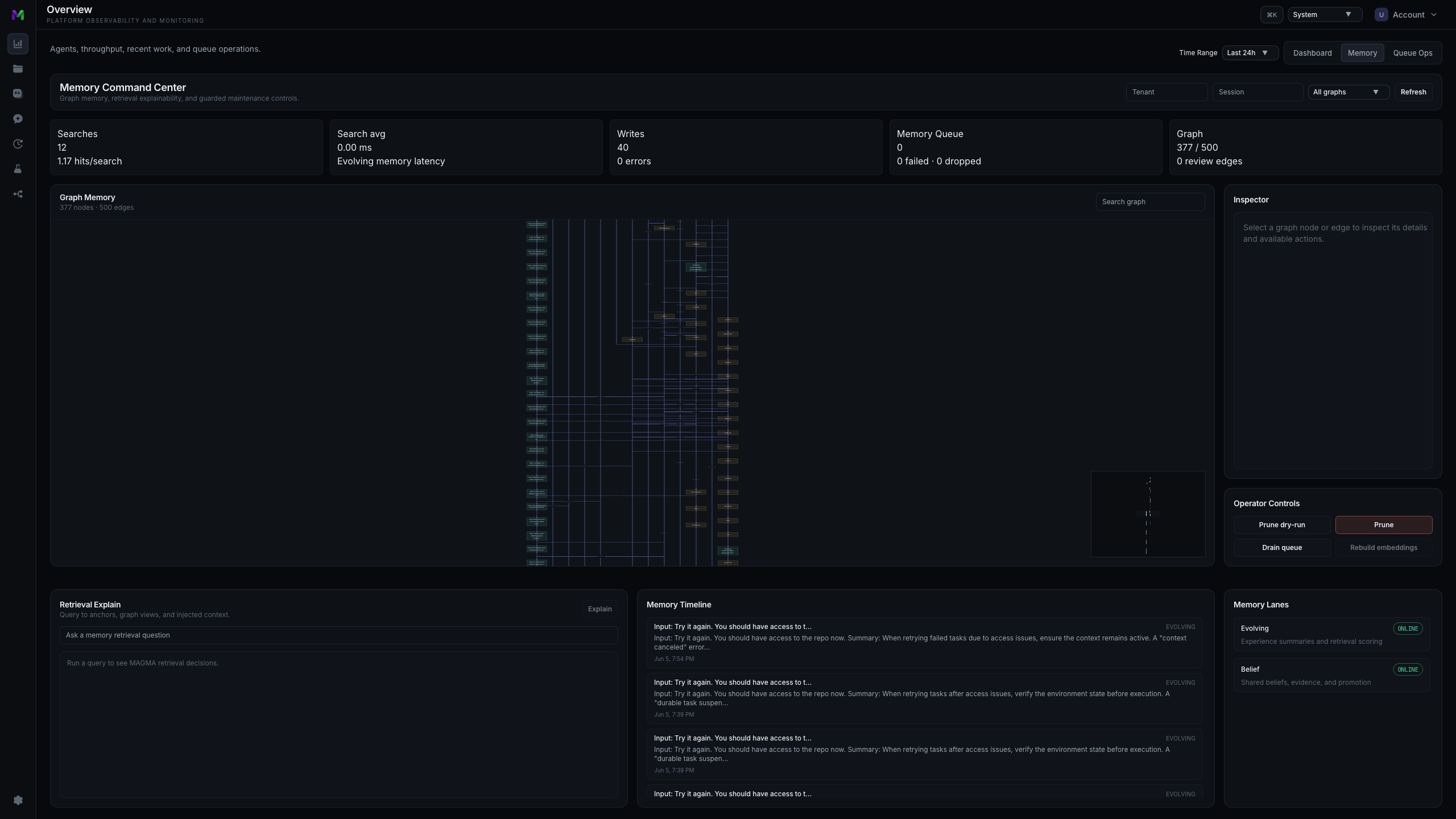
MENTIONS and RELATED_TO edges from the run.The Memory tab exposes the same metrics available at /api/metrics/memory. The Graph Memory panel renders MAGMA state directly — each edge is selectable and, with the guarded controls, retractable. The Memory Lanes rail on the right shows live status for Evolving, Belief (an emerging lane backed by internal/agent/memory/belief), MAGMA, and RAG + Embeddings. Tenant, session, and graph-type filters scope the view to a single run.
Composition across a long horizon
The four subsystems are complementary by design: each handles a scope that the others do not.
timeline
    title Memory lane handoff during a multi-day objective
    Day 1 morning  : Transit — orchestrator writes plan and task keys
                   : Evolving — retrieve lessons from prior research runs
    Day 1 afternoon: Summarization — compress the growing research conversation
                   : MAGMA — ingest findings as linked event nodes
    Day 2          : Transit — writer agents read plan and source keys
                   : MAGMA — traverse entity and causal graphs for context
    Day 2 later    : Evolving — distill strategy card, promote to user scope
    Future runs    : Evolving + MAGMA — retrieve lesson and traverse graph
The mapping between failure mode and subsystem is direct:
| Failure mode | Subsystem | Scope | Written by |
|---|---|---|---|
| Context overflow | Summarization | Single conversation | Automatically, preflight |
| Cross-agent state | Transit | Cross-agent, cross-run | Agent, by explicit key |
| Repeated failure | Evolving Memory | Cross-run experience | Automatically, post-task distillation |
| Missing relational context | MAGMA | Cross-event graph | Automatically, on ingest |
Getting started
Each subsystem is independently opt-in. A minimal progression:
- Summarization — set
summaryEnabled: true. The Context summarized badge appears in chat when compression fires. - Transit — set
enableTools: trueandtransit.enabled: true. Write a note underproject/demo/briefin one session; read it in another. - Evolving Memory — set
enabled: trueandenableRAG: true. Run several similar tasks, then query/api/debug/memory/explainto inspect the per-component retrieval scores. - MAGMA — set
magma.enabled: true. Ingest a document set and explore the Graph Memory panel in the Memory tab.
Source map (develop branch)
- Memory package —
internal/agent/memory/README.md - Summarization —
docs/summarization.md - Transit —
docs/transit.md·internal/transit/service.go·store.go·types.go - Evolving Memory + ReMem —
docs/evolving_memory.md·evolving.go·evolving_search.go·evolving_scoring.go·remem.go·metrics.go - Belief lane —
internal/agent/memory/belief - MAGMA —
docs/magma_memory.md·internal/rag/service/magma.go - Project — github.com/intelligencedev/manifold